 AI for dentists, from a dentist
Install your kit
Pick your route, follow its steps, type one prompt. If you can download a file and copy and paste, you can do this. All you need is a Claude or ChatGPT subscription and a computer.
The short version
Bought a pack and use Claude? This is the whole install, about ten minutes.
- Download the pack from your receipt email and unzip it. Inside, open the
claude-ai-uploadsfolder and find the one zip whose name starts withONE-UPLOAD. - In Claude, click your name, then Settings, then Capabilities, and switch on Cloud code execution and file creation. Then Customize, Skills, +, Upload a skill, and pick that
ONE-UPLOADzip. - Start a new chat and type the kit’s first prompt. It asks you about your practice, then does its first job.
Use ChatGPT, or want the kits on your computer? Pick your route below. Stuck? Email fullarch@drskots.com and we reply within two working days.
1 · Pick your route
- Claude on the web or the desktop appFor every kit that writes, and Cowork for connectors and weekly checks.Show me the steps
- The Claude or ChatGPT desktop app, on your computerFor the Edit and Post kit (it edits video and makes slides on your computer), for the Practice Website Kit and for saving pages straight into WordPress. Comes with your Claude or ChatGPT plan.Show me the steps
- A ChatGPT ProjectChatGPT on the web, for the writing kits.Show me the steps
Starting from nothing? Get Claude Pro (about £18 a month when we checked in September 2026) and the Claude desktop app. It covers every kit. Already pay for ChatGPT? That works too. Every plan compared.
2 · Install it
Claude on the web or the desktop app
ONE-UPLOAD, from the pack’s claude-ai-uploads folder. It holds every kit in the pack and sends each request to the right one. Prefer them one by one? Upload the separate zips instead, not both.- Open Claude, click your name in the bottom left, then Settings, then Capabilities. Switch on Cloud code execution and file creation.
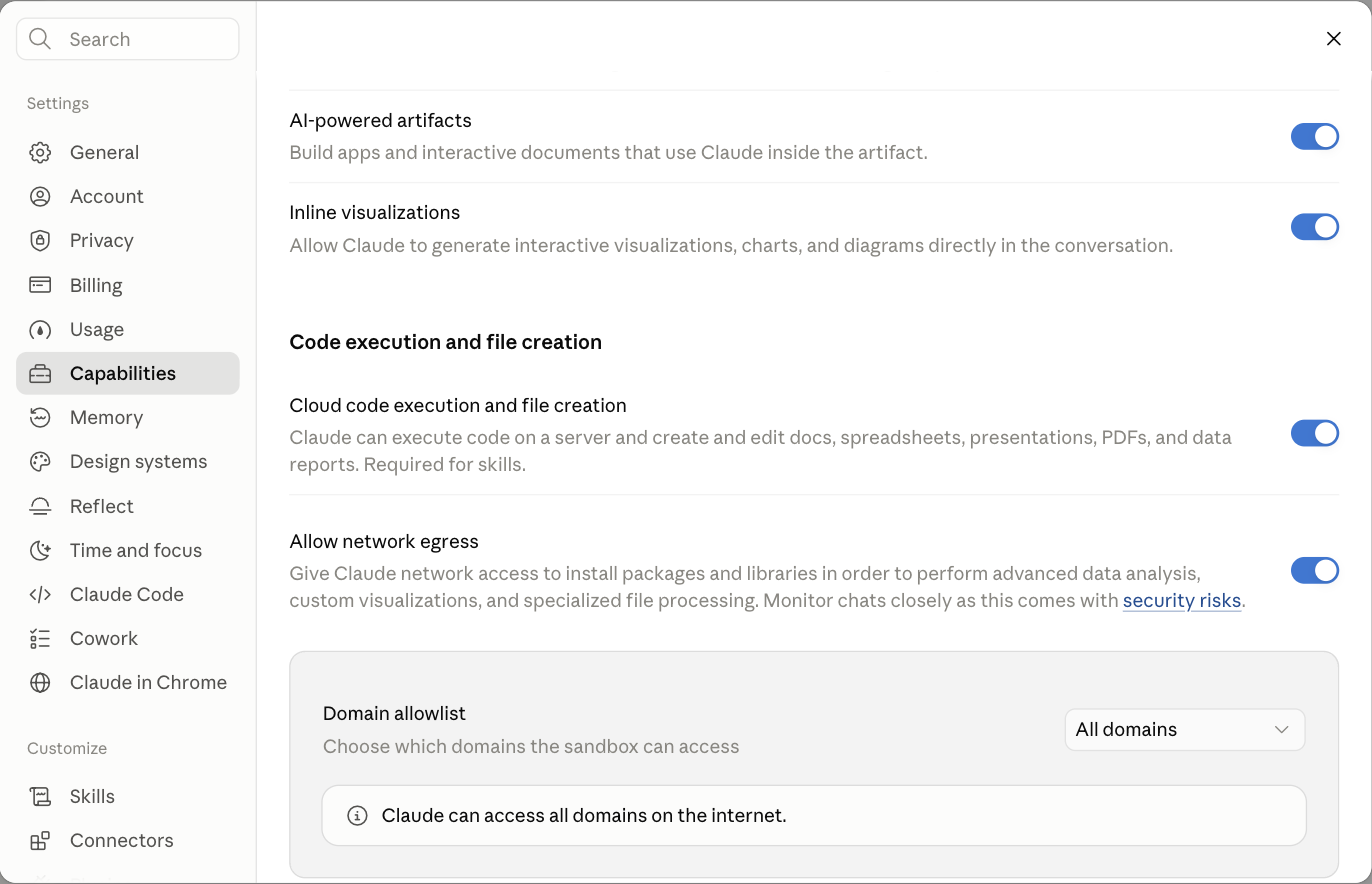
Claude Settings, Capabilities, with Cloud code execution and file creation switched on. - Still in Settings, open Privacy and switch off Help improve Claude.
- Under Customize, click Skills, then +, then + Create skill, then Upload a skill. Pick the kit’s zip exactly as you downloaded it, for example
content-fa.zip. Don’t unzip it. - The kit appears in your skills list with its switch on. Leave it on.
- Start a new chat and type the kit’s first prompt.
Bought a pack? Upload only the zip whose name starts with ONE-UPLOAD: that is the whole pack. Then start with the Ranking Kit for The Practice Pack, or the Content Ideas & Script Kit for The Dentist Pack.
Two kits read your website (the Ranking Kit and the Landing Page Kit). For those only, go back to Capabilities, switch on Allow network egress and add your website to the Domain allowlist. Every other kit works without this.
Cowork uses the same uploaded kits: open Cowork in the desktop app, connect your practice folder, and switch on a connector with +, then Connectors. From 6 October 2026 Cowork runs in the cloud: scheduled tasks keep running with your laptop closed. If a task reads or saves files on your computer, keep the Claude desktop app open.
The Claude or ChatGPT desktop app, on your computer
Install-on-Mac.command or Install-on-Windows.bat inside it. It copies every kit into both desktop apps, with nothing else to install, and moves any older copy to a backup folder first. Mac won’t open it? Right click it and choose Open (on macOS 15 or later: System Settings, Privacy & Security, Open Anyway). Windows says “Windows protected your PC”? Click More info, then Run anyway.In the Claude desktop app, open the Code tab. In the ChatGPT desktop app, start a new task in your practice folder (it comes with your ChatGPT plan). Uploaded the kit to Claude already? The Code tab has it too: skip to step 4.
- Unzip the kit. On a Mac, double click the zip. On Windows, right click it and choose Extract All.
- Open the skills folder. Mac: in Finder press Cmd, Shift and G and type
~/.claude/skills(for ChatGPT,~/.agents/skills). Windows: in File Explorer type%USERPROFILE%\.claude\skills(for ChatGPT,%USERPROFILE%\.agents\skills). Make the folder if it isn’t there. - Move the unzipped kit folder in. Its main file should sit at
~/.claude/skills/content-fa/SKILL.md, with your kit’s name. - Open the desktop app in your practice folder and type the kit’s first prompt.
The ChatGPT desktop app asks before it goes online. When a kit needs your website, HighLevel or an ads platform, say yes for that site only.
The Social Media: Edit and Post Viral Content Kit needs ffmpeg and a transcriber, about an hour the first time: the ffmpeg walkthrough. Every kit at once, and other AI tools: the one command install.
A ChatGPT Project, for the writing kits
chatgpt folder. Paste its INSTRUCTIONS.md into the project’s instructions, upload its KNOWLEDGE.md as the project’s one file, and type the first prompt. The kit’s scripts don’t run here, so it checks the rules by reading them.On ChatGPT on the web a Project holds the kit. It can’t sign in to your accounts, so you paste the results in yourself. For the video kit, or to save drafts into WordPress, use the ChatGPT desktop app (the middle tab).
- In ChatGPT, open Settings, then Data controls, and switch off Improve the model for everyone.
- Click Projects, then New project. Call it “My practice”.
- Unzip the kit. Open the project’s Instructions and paste in the whole of
chatgpt/INSTRUCTIONS.md. - Add
chatgpt/KNOWLEDGE.mdas the project’s file. It holds the whole kit in one file. - Start a chat inside the project and type the kit’s first prompt.
3 · Type the first prompt
Each kit asks two or three questions, then gives you its first result. It never changes anything in your accounts without listing the change and asking first.
- Google & ChatGPT Ranking KitRewrite my Google Business Profile description and give me my top three website fixes.
- Dentist Website KitBuild my website.
- Social Media: Content Ideas & Script KitGive me 20 content ideas.
- Social Media: Edit and Post Viral Content KitSet up my video look. (in the Claude or ChatGPT desktop app)
- Facebook & Instagram Ads KitPlan my first Facebook and Instagram campaign and write eight ads. Don't build anything yet.
- Google Ads KitPlan my first Google Ads campaign. Don't build anything yet.
- Practice Website KitPlan my practice website.
- Landing Page & Funnel KitBuild me a landing page for my top treatment.
- GDC & ASA CheckerCheck this before I post it: (then paste your post, ad or page)
Bought a kit on its own before October 2026? Never Miss a Lead Kit: "Set up my lead follow up kit."
4 · Let it remember your practice
After your first result, the kit offers to remember your practice (or type Set up my practice profile): ten quick questions, saved as practice-profile.md, which every kit reads. Keep it in a Claude or ChatGPT Project called “My practice”, or in your practice folder. More on the profile.
5 · Connect what your kit needs, if anything
The Content Ideas & Script Kit needs nothing. Without a connection, most kits give you the finished words to paste in yourself. Never type a password, token or key into the chat. Which kit needs what.
- WordPress
- Wix
- Meta Ads
- Windsor.ai
- Gmail
- GoHighLevel
- WhatsApp on GoHighLevel
- ffmpeg and the transcriber
- Google Business Profile
- A weekly check
- Other AI tools
Patient data: never put anything that identifies a patient into a personal AI chat. The full rule.
When things go wrong
“Invalid skill”. Upload the zip exactly as you downloaded it, not unzipped and zipped again.
The kit doesn’t start. Check its switch in Customize, Skills, then type its first prompt in a new chat, for example “Give me 20 content ideas.”.
“I can’t run code”. Switch on Cloud code execution and file creation in Settings, Capabilities. More fixes.
Getting help
- Email: fullarch@drskots.com. Send a screenshot of where you’re stuck and tell us which kit and which tool. We reply within two working days.
- The Build Session, £249: 90 minutes on a video call. We install your kits with you and set up your next workflows, in your own accounts. You share your screen and do the clicking, so no passwords leave your hands. Book the session.
- Install or Refund: if a kit doesn’t work for you within 30 days, we help you make it work. If we can’t, we refund you in full. How to claim.