 AI for dentists, from a dentist
Patient data: the rules
Patient details never go into AI by mistake.
Remove names and anything that could identify someone first. For regular work about real patients, use a business plan your practice has a data agreement for. Nothing we make ever stores, posts or sends patient details.
Free to print, no sign up. For you, your team and your front desk.
Four habits
- 1Settings firstTraining off (“Help improve our AI models”), and memory and chat sharing used with care.
- 2Anonymise in five stepsBefore you paste, then run the second check.
- 3Right plan for the jobMarketing on any plan. Regular patient work only on a business plan with a data agreement. In the US, a signed business associate agreement first.
- 4Never confirm someone is a patientNot in review replies, posts or ads.
Before you use AI with anything about patients*
One page. Ten minutes. Then a habit.
1. Change these settings first (5 minutes)
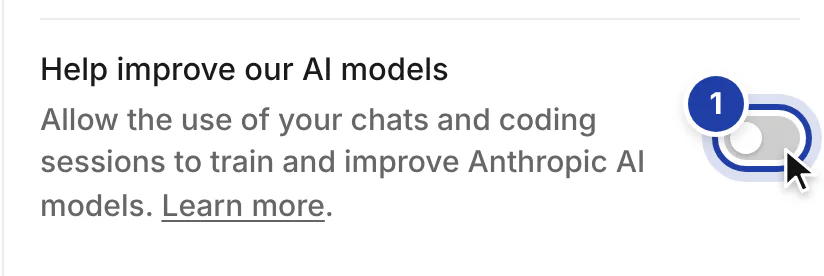
- Claude: Settings › Privacy. Turn off Help improve our AI models. With it off, Anthropic keeps chats for 30 days and doesn’t train on them (Free, Pro and Max plans). Team and Enterprise are never used for training.
- ChatGPT: Settings › Data controls. Turn off Improve the model for everyone.
- Don’t share a link to a chat that held practice work. A shared project is visible to everyone in it.
2. What to connect, and what not
Fine to connect
- A marketing inbox, not the one patients write to
- A Google Drive folder with marketing photos only
- Google Business Profile, Search Console and Analytics
- Your Facebook, Instagram and Google ad accounts, to read campaigns
- Your website (WordPress or Wix) and Canva
- Apify, for public Instagram accounts
Don’t connect
- The practice inbox where patients write, unless you’re on a business plan your practice has a data agreement for
- Your practice software or patient records
- Your whole Drive, if clinical folders are in it
- WhatsApp chats with patients
- Contact lists of patients, to Claude or to any ad platform
3. Never paste
- Names.
- Dates of birth.
- Addresses, phone numbers, emails.
- Record, health or insurance ID numbers.
- Appointment dates tied to a person.
- X-rays or clinical photos with a face or a name.
- Screenshots of your practice software.
- A full complaint letter.
- A transcript with names in it.
4. Anonymise in five steps
- 1
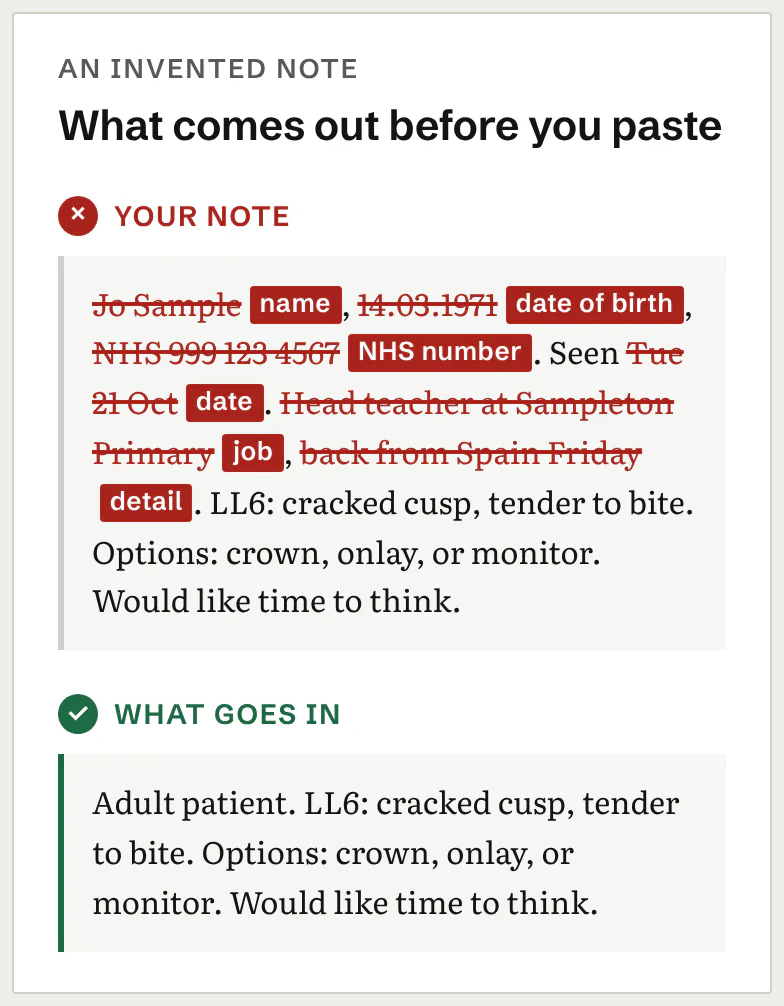
Swap names for [PATIENT], [DENTIST], [NURSE].
- 2
Take out contact details and any ID numbers.
- 3
Swap exact dates for “last spring” or “two weeks ago”.
- 4
Take out rare details that point to one person: their job, their street, an unusual story.
- 5
Paste, then ask: “Is there anything in this that could identify a person?” Fix what it finds before you use the reply.
5. In public
- Never confirm that someone is a patient: not in a review reply, a post or an ad.
- Before and afters, and reviews with names: only with written consent, kept on file.
6. Which plan for which job
- Marketing (posts, reels, ads, your website, review replies with no details): any plan, with training off.
- Letters, complaints or transcripts about real patients: anonymised first, and on a business plan your practice has accepted the data terms for: Claude Team (from 2 seats) or Enterprise.
- US practices with protected health information: only Claude Enterprise with HIPAA turned on and the business associate agreement accepted. Team, Pro and Max can’t sign one.
Claude Team needs at least 2 seats. A standard seat is $25 a month, or $20 a month billed yearly (US prices, before tax, checked 29 October 2026).
7. If something slips
- 1Delete the chat.
- 2Tell your practice manager or data lead.
- 3Note it in your incident log.
- 4Follow your country’s breach rules.
Transcripts and recordings
- Consultation transcripts: anonymised transcripts only, on a business plan your practice has a data agreement for (Claude Team or Enterprise).
- Recording a consultation needs the patient’s documented consent, a practice owned device, and deleting the audio once you’ve used it.
- In the US, a transcript with protected health information goes only into Claude Enterprise with HIPAA turned on and the business associate agreement accepted.
Where you practise
| Where | What it means for AI |
|---|---|
| UK | Health information is special category data under UK GDPR. Before any of it goes into a tool, your practice needs a legal basis, a data processing agreement with the company behind the tool, and a line in your privacy notice. Your GDC standards on confidentiality apply just the same. For the detail: the BDA and the ICO. |
| US | Protected health information falls under HIPAA. It goes only into Claude Enterprise with HIPAA turned on and the business associate agreement (BAA) accepted. Team, Pro and Max can’t sign one. |
| Everywhere else | Check your own data protection law and your professional body’s guidance before anything about a patient goes into an AI tool. |
What we never see
- We never see your chats, your accounts or your data.
- The flows run in your own Claude, under your own plan. Your chats are processed by Anthropic under your plan’s terms, not by us.
- The writing flows need no patient details. If you paste some in, they ask you to take them out, but that is a safety net, not a guarantee, so check before you paste.
* Written for practices in the UK and the US. Elsewhere, check your own data protection law and your professional body’s guidance. This is not legal advice. Checked 29 October 2026.
We are dentists, not lawyers. Your practice is responsible for its own data. Questions? fullarch@drskots.com